Pre-event teasers, a hashtag that works, live coverage, and the post-event content that sells next year.
Read the transcript
Social media and content for events.
Pre-event teasers, a hashtag that works, live coverage, and the post-event content that sells next year.
Three phases, three jobs.
Before the event, social content sells tickets and builds anticipation.
During, it shows the people who did not come what they are missing and gives the people who did come something to share.
Before: the teaser calendar.
Launch post with the date, the venue and the reason to come. One image, one line, the link.
Announcements that earn their own post: the headline act, the keynote, the menu, the sponsor, the early-bird deadline.
A hashtag that works.
Short, specific, unused: check it before you print it. #HarbourGala2026 beats #gala.
Put it on the signage, the program, the screens and the photo wall, and ask the MC to say it once.
During: live coverage.
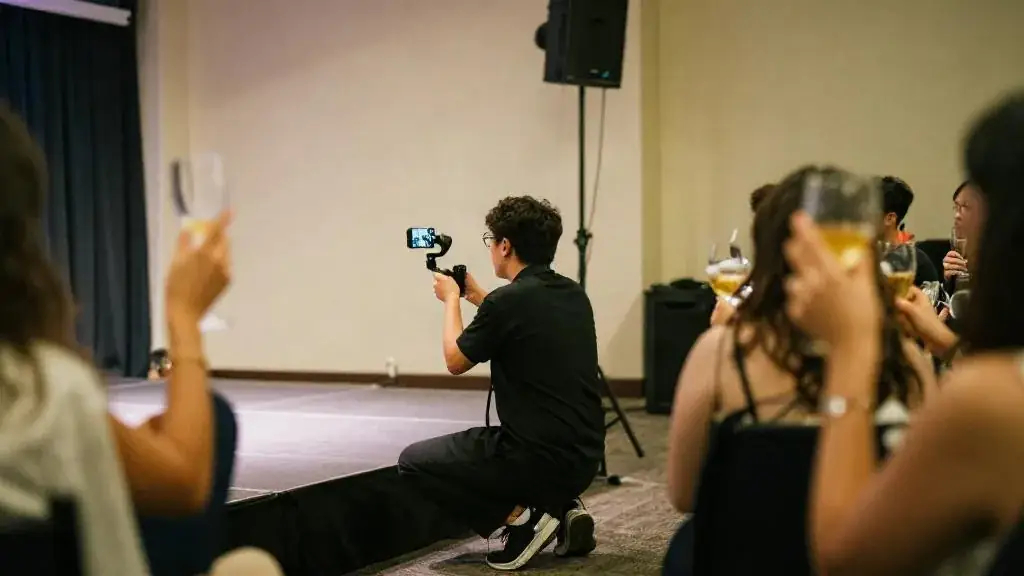
Assign one person whose only job is content: arrivals, the room before doors, the first act, the moment (the paddle raise, the first dance, the reveal), the crowd.
Short vertical video of the act plus one strong photo of the room beats fifty mediocre photos.
Rights and consent.
Notice at registration and signage at the entrance ("photography and video are taking place; tell a staff member if you prefer not to be photographed") covers most events; honour opt-outs.
Performers' images are theirs: the contract should say whether you may post their act.
That is the lesson. The worksheet and the quiz are just below this video.
What you will be able to do
- Plan a content calendar for an event
- Brief a photographer for social
- Reuse content after the event
Three phases, three jobs
Before the event, social content sells tickets and builds anticipation. During, it shows the people who did not come what they are missing and gives the people who did come something to share. After, it is next year’s sales material. Plan all three on one calendar.
Before: the teaser calendar
- Launch post with the date, the venue and the reason to come. One image, one line, the link.
- Announcements that earn their own post: the headline act, the keynote, the menu, the sponsor, the early-bird deadline.
- Behind-the-scenes: the site visit, the tasting, the rehearsal. People buy from people.
- Countdown in the final week: “five days”, with a different reason each day.
Cadence: two to three posts a week for six weeks is plenty. Repost to the client’s and sponsors’ channels; ask performers to share their own announcement, which most will.
A hashtag that works
Short, specific, unused: check it before you print it. #HarbourGala2026 beats #gala. Put it on the signage, the program, the screens and the photo wall, and ask the MC to say it once.

During: live coverage
Assign one person whose only job is content: arrivals, the room before doors, the first act, the moment (the paddle raise, the first dance, the reveal), the crowd. Short vertical video of the act plus one strong photo of the room beats fifty mediocre photos. Post two or three times during the event, not twenty. Get the photographer to deliver ten selects the same night for the morning post.
Rights and consent
Notice at registration and signage at the entrance (“photography and video are taking place; tell a staff member if you prefer not to be photographed”) covers most events; honour opt-outs. Performers’ images are theirs: the contract should say whether you may post their act. For children’s events, get parental consent in writing before posting faces.

After: the content that sells next year
- A thank-you post within 24 hours with the total raised or the attendance.
- A 60–90 second recap video within a week.
- A gallery link to attendees with the survey.
- A short recap article on the site within a month, which is where sponsors look when deciding whether to renew.
Worked example
The Harbour Gala’s calendar: six weeks of two posts a week, the mentalist’s announcement being the best-performing; live coverage by the foundation’s communications coordinator; a next-morning post with the photo of the paddle raise and the total; a recap video four days later. Three sponsors reposted the recap. That is the stewardship that renews tables.

Common mistakes
- Twenty posts on the night and none the next morning.
- A hashtag nobody can spell.
- Posting a performer’s act without permission.
- No one assigned to content, so the planner does it from a phone at midnight.
- Waiting a month for the professional photos before saying anything.
Canadian rules that apply
Social media is not a law-free zone, and several rules apply to event promotion in Ontario.
Paid and gifted promotion has to be disclosed. If a creator receives free tickets, a fee or any other benefit to post about your event, the connection must be clear in the post itself, using a plain label such as “ad” or “sponsored” or the platform’s paid-partnership tool. The Competition Bureau treats undisclosed endorsements as potentially misleading, and the responsibility can fall on the organizer as well as the creator.
Contests and giveaways have their own requirements. A ticket giveaway that awards a prize by chance is close to an illegal lottery under the Criminal Code unless it is structured correctly, which is why Canadian contests typically require no purchase and include a skill-testing question. The Competition Act also expects the rules to disclose the number and value of prizes and the odds of winning. Post the full rules on a page and link to them from every contest post. If you plan anything larger than a pair of tickets, have the rules reviewed.
CASL generally does not cover a public post, but it can cover a direct message that promotes ticket sales to someone’s account. Treat promotional direct messages with the same consent care as email.
Music in your content is licensed separately from music at your event. A popular track in a recap video can get the video muted or removed. Use the platform’s licensed music library, music the performer has cleared, or a properly licensed track.
GTA practice notes
The GTA is many audiences sharing one map. A downtown launch party, a Markham community festival and a Mississauga trade event reach people through different channels: neighbourhood groups, community and language-specific pages, workplace networks, and the venue’s and sponsors’ followings. Before writing a single post, list where your guests already are and post there, rather than building a new account from nothing.
Use the venue. Many GTA venues have strong followings of their own and will share an event they are proud of, especially with a good photograph of their room. Tag the venue, the caterer and the performers with their permission; each share puts the event in front of an audience that already trusts the source.
Plan for the signal. Large basements, older ballrooms and some convention halls have poor mobile reception. Ask for the venue Wi-Fi details in advance for the content person, or plan to post from a spot with signal at set times.
Accessibility applies here too. Captions on video, alt text on images and readable contrast on graphics serve guests with disabilities and are expected under accessibility standards that apply to many Ontario organizations. Captions also help everyone who scrolls with the sound off, which is most people.
Questions to ask the client
- Who owns the accounts we post from, and who approves posts before they go out?
- Which performers, speakers and sponsors have agreed to be photographed, filmed and tagged, and on what terms?
- Are any guests, such as children, patients, clients or staff, who must not appear in public content?
- Who will deliver the photos and video, by when, and with what usage rights for the client, the venue and the sponsors?
- Is any of the promotion paid or gifted, and who is making sure it is disclosed?
- What one number will the thank-you post report, and who confirms it?
Briefing the photographer for social
A photographer shooting for the archive and a photographer shooting for social want different things. Give them a written shot list with times from the run of show: the empty room before doors, the first guests arriving, the sponsor’s activation, the performer’s key moment, the crowd reacting, and the one image that will carry the next-morning post. Ask for a mix of vertical and horizontal frames, and agree in the contract on how many selects arrive that night and how many within the week.
Tell the photographer about opt-outs. A small coloured sticker or lanyard for guests who do not want to be photographed, briefed to the photographer at the start, honours the consent you collected at registration and avoids an awkward deletion later.
How this connects to the next lesson
Every image on this list is also sponsor evidence. The photograph of a guest at the sponsor’s dessert bar, the clip of the act “presented by”, the screenshot of the sponsor reposting your recap: these become the fulfilment report in sponsorship packages that get signed. Write the sponsor shots into the brief now, so you are not hunting for them a week after the event.
Worksheet
Download the worksheet, complete it for your own event (or the running gala example), and keep it in your course binder. It takes about 10 minutes.
Check your understanding
Related guides, venues and vendors

Managing vendors on the day
Module 10: Event Day · 15 min
Arrival checks, the pre-event briefing, problem escalation, and paying balances on site.
Read more
Volunteers and staffing
Specialist · Festivals & Public Events · 15 min
Recruiting, briefing, shifts, radios and recognition.
Read more
Building the budget from the goal
Module 3: Budgeting · 15 min
Start from the envelope, split by category using GTA ratios, then price line by line. Use the budget calculator and learn when…
Read more